What Is a Node in Networking? Types & Examples
A node in networking is any device, connection point, or system that participates in a computer network by sending, receiving, storing, forwarding, or processing data. Computers, smartphones, routers, switches, servers, printers, and many Internet of Things devices can all function as network nodes depending on the network design. Nodes are essential because a network cannot exchange information unless devices can connect and communicate with one another. Some nodes mainly create or consume data, while others help move data between different parts of the network. Understanding what a node is makes many networking concepts easier to learn. It also provides a useful foundation for studying IP addresses, routing, network topology, and communication protocols.
The word node can have slightly different meanings depending on the type of network being discussed. In a home network, a laptop connected to Wi-Fi can be considered a node because it exchanges data through the router. In an enterprise network, servers, switches, firewalls, access points, and employee computers can all operate as nodes. In telecommunications, nodes may include switching systems and other infrastructure responsible for handling network traffic. Distributed systems and blockchain networks also use the term node to describe computers participating in a shared system. The exact role changes, but the basic concept remains the same: a node is an identifiable point within a network.
Knowing how network nodes work is useful for students, IT professionals, business owners, developers, and anyone learning computer networking. Nodes help explain how information moves from one device to another and why certain network devices have different responsibilities. Understanding them can also make troubleshooting easier because most network problems involve a device, connection, address, or communication path somewhere between nodes. This guide explains the meaning of a node in networking, how nodes communicate, the major types of network nodes, practical examples, and the difference between nodes, hosts, endpoints, and networking devices.
What Is a Node in Networking?
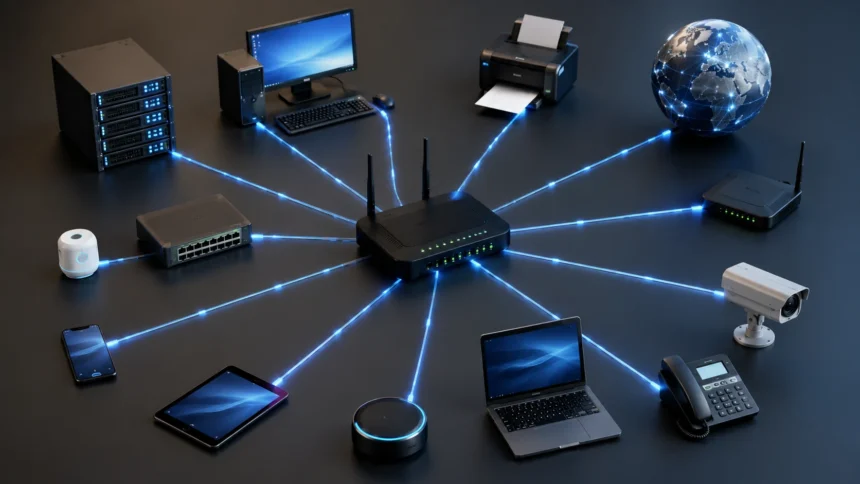
A node in networking is a point within a network that can communicate with other points or participate in the movement of data. The node may be a physical device such as a desktop computer, router, switch, or printer, but some networking contexts also recognize virtual systems as nodes. What matters is that the node has a role in network communication or processing. It may originate information, receive information, forward packets, store data, or perform several of these tasks. A node therefore does not need to be a traditional computer. Any device capable of meaningfully participating in the network may qualify.
A typical network contains many nodes working together. Consider a simple home Wi-Fi network with a laptop, smartphone, smart television, wireless printer, and router. Each connected device can be treated as a node because it communicates across the network. The router is also a node, but its responsibility differs from that of the laptop or television. Instead of primarily creating user content, the router helps direct traffic between local devices and external networks. This example demonstrates that nodes can perform very different functions while still belonging to the same network.
Many network nodes have identifiers that allow other devices to recognize and communicate with them. An IP address is one common identifier used at the network layer, while a MAC address identifies a network interface at the data-link layer. A device may have several network interfaces and therefore multiple addresses depending on how it is connected. These identifiers help networking equipment determine where information should be sent. Without addressing, devices would struggle to distinguish one destination from another. Node identification is therefore closely connected with the broader concepts of network addressing and routing.
Not every node communicates directly with every other node. In many networks, information moves through several intermediate nodes before reaching its final destination. For example, a packet sent from a laptop to a website server may first pass through a local wireless access point or router. It may then travel through equipment operated by an internet service provider before crossing additional routers on the internet. The server receiving the request acts as another node at the destination. This chain of interconnected nodes allows information to travel across extremely large networks without requiring every device to maintain a direct physical connection with every other device.
The term node is intentionally broad because modern networks contain many types of connected technology. Traditional definitions often focus on computers and networking equipment, but today’s networks also include security cameras, smart thermostats, sensors, industrial machines, wearable devices, virtual machines, and cloud-based resources. Some nodes are highly powerful computers, while others are tiny devices with limited processing capabilities. What they share is participation in a communication environment. Thinking of nodes as functional points inside a network makes the concept easier to apply across both simple and complex networking systems.
How Does a Network Node Work?
A network node works by connecting to a communication medium and exchanging data according to agreed networking rules called protocols. The connection may use an Ethernet cable, fiber connection, Wi-Fi signal, cellular network, or another wired or wireless technology. Once connected, the node can create, receive, or forward network traffic depending on its purpose. Software and hardware inside the device determine how incoming information should be handled. A laptop typically processes data intended for the user, while a router examines addressing information and forwards packets toward another destination. Different nodes therefore handle traffic according to their assigned roles.
Communication between nodes usually involves several networking layers working together. An application may generate data, which is then prepared for transmission using transport and network protocols. The information is divided into manageable units such as segments, packets, or frames depending on the networking layer being discussed. Addressing information is added so networking devices can determine the correct destination. The data then travels across the physical or wireless connection to another node. At the receiving end, networking software interprets the information and passes it to the appropriate application or service.
When two devices communicate on the same local network, switches commonly help deliver data between them. A switch learns which devices are connected to its ports by examining MAC addresses. It can then forward Ethernet frames toward the appropriate destination rather than sending every frame to every connected device. The switch itself functions as an important network node because it participates in traffic handling. This process allows several computers, printers, servers, and other devices to share the same local network efficiently. Modern switches can also provide additional functions such as virtual LAN support, traffic prioritization, monitoring, and security controls.
Routers operate differently because they connect separate IP networks and determine where packets should travel next. A home router, for example, links a private local network with the wider internet. When a computer requests a web page, the router examines the packet’s destination and forwards it toward the appropriate external network. Routers use routing tables and networking protocols to make forwarding decisions. On the public internet, packets may pass through many routers before reaching a destination server. Each router acts as an intermediate node helping move data along the communication path.
Network communication would be unreliable if nodes simply transmitted information without following shared rules. Protocols such as Ethernet, IP, TCP, UDP, DNS, and HTTP define different parts of the communication process. These protocols determine how devices address information, establish connections, detect problems, locate services, and exchange application data. Nodes support different protocols depending on their capabilities and responsibilities. A network printer does not need to perform exactly the same functions as a core internet router. Standardized protocols allow diverse nodes to communicate even when their hardware, operating systems, and purposes are very different.
Types of Nodes in Computer Networks
End-user devices are among the most familiar types of network nodes. Desktop computers, laptops, smartphones, tablets, and workstations connect to networks so users can access applications, files, websites, printers, and communication services. These devices usually generate and consume network traffic rather than primarily forwarding traffic for other nodes. They may connect through Ethernet, Wi-Fi, cellular networks, or several connection methods. Each device normally receives an IP address when it joins an IP network. Because these nodes are used directly by people, they are often described as endpoint devices or hosts in addition to being network nodes.
Servers are another major type of node because they provide resources or services to other devices. A server may host websites, databases, business applications, shared files, email services, authentication systems, or many other workloads. Some servers are physical machines located in offices or data centers, while others exist as virtual machines or cloud instances. Clients send requests across the network, and servers process those requests before returning information. A single physical server can sometimes host several virtual services. Servers are therefore central nodes in many business, internet, and cloud networks.
Routers are infrastructure nodes designed to connect different networks and direct traffic between them. They examine destination IP addresses and determine where packets should be forwarded based on routing information. Small home routers may connect a handful of local devices to an internet service provider, while enterprise and internet routers can process enormous amounts of traffic. Some routers also provide firewalling, network address translation, virtual private networking, or traffic-management functions. Their primary networking purpose, however, is packet forwarding between networks. Without routers, separate IP networks would have much more difficulty communicating across large distances.
Switches are network nodes that primarily connect devices within local-area networks. They receive Ethernet frames and forward them based on MAC-address information. This makes communication more efficient than older hub-based networking because a switch can direct traffic toward the relevant port rather than broadcasting every transmission unnecessarily. Managed switches may also support VLANs, access controls, monitoring, link aggregation, and quality-of-service settings. Enterprise networks may contain access switches for users and more powerful distribution or core switches for high-volume traffic. Switches therefore form a major part of the internal structure of modern wired networks.
Other network-node types include wireless access points, firewalls, printers, storage systems, cameras, sensors, gateways, load balancers, and Internet of Things devices. Access points connect wireless clients to wired networks, while firewalls inspect and control traffic according to security policies. Network-attached storage devices provide files or storage capacity to other machines. Smart cameras and environmental sensors generate data that can be transmitted to applications or monitoring platforms. Gateways can translate between different systems or protocols. Modern networks therefore contain far more node types than traditional collections of desktop computers and servers.
Examples of Network Nodes
A home laptop connected to a wireless router is a simple example of a network node. The laptop receives an IP address and exchanges data with other systems whenever the user browses websites, streams video, sends email, or accesses shared devices. Its Wi-Fi adapter also has a MAC address used for communication on the local wireless network. When the laptop requests information from the internet, packets move through the router toward external networks. Responses travel back through the same general networking structure. The laptop therefore acts as an endpoint node that both sends and receives data.
A network printer is another common node that demonstrates why nodes do not need to be general-purpose computers. When connected through Ethernet or Wi-Fi, the printer receives a network address that allows employees or household devices to locate it. A computer sends print data over the network, and the printer processes that information to produce the physical document. Some printers also provide web-based management pages, scanning services, status information, and security settings. These capabilities require ongoing network communication. Although printing is its primary purpose, the device still participates as an identifiable network node.
A router provides a different example because it acts as an intermediary rather than simply a destination. Imagine a smartphone connected to home Wi-Fi while opening an online store. The phone sends network traffic to the router, which forwards packets toward the internet service provider. Additional routers carry the traffic across interconnected networks until it reaches the company’s servers. The response then travels back through networking infrastructure toward the smartphone. The home router is only one node in a much larger path, but its forwarding role is essential. This illustrates how intermediate nodes enable communication between distant endpoints.
A smart security camera can also be considered a network node. The camera may connect through Wi-Fi or Ethernet and transmit video to a local recording system, cloud service, or mobile application. It can receive commands that change settings, adjust recording behavior, or install software updates. Some models also communicate events such as motion detection or doorbell presses. Because the camera creates, sends, and receives digital information through the network, it clearly functions as a node. Internet of Things networks can contain hundreds or thousands of similar sensors and connected devices.
Cloud servers provide examples of nodes that users may never physically see. A company can create virtual machines, containers, databases, or other cloud resources inside remote data centers. These systems receive network addresses and communicate with applications, users, storage services, and other cloud components. To applications, a virtual server can behave much like a traditional physical server connected to an enterprise network. Virtualization therefore expands the concept of a node beyond one physical device per connection point. Modern networking increasingly includes both physical and software-defined nodes working together.
Node vs Host vs Endpoint vs Network Device
The terms node and host are related but are not always identical. A node is a broad term for almost any point that participates in network communication. A host usually refers more specifically to a device or system that has a network address and runs applications or provides services. Computers, servers, and smartphones are commonly described as hosts because they originate or receive application-level communication. Routers and certain switches are certainly nodes, but they are not always called hosts when their main purpose is forwarding traffic. The exact terminology can vary between textbooks, technologies, and networking contexts.
An endpoint is another closely related term used frequently in networking and cybersecurity. An endpoint usually describes a device located at the edge of a communication path where data is created or consumed. Laptops, smartphones, desktops, and servers can all be endpoints. Security teams often talk about endpoint protection when discussing antivirus software, endpoint detection and response, device management, and access controls. A router is a network node but is usually not considered an ordinary user endpoint. Endpoint therefore emphasizes a device’s position and role from the perspective of users, applications, or security management.
The phrase network device often refers to hardware specifically designed to support networking functions. Routers, switches, wireless access points, firewalls, bridges, gateways, and modems are familiar network devices. These systems are all network nodes because they participate in communication or traffic handling. However, not every node would normally be called networking equipment. A user’s smartphone is clearly a node, but people rarely describe it as a network device in the same sense as an enterprise switch. The distinction is mostly about purpose rather than whether the system participates in networking.
A client is another term that overlaps with the node concept. In a client-server architecture, the client requests resources or services from a server. A browser on a laptop may act as a client when requesting a web page, while the web server responds to the request. Both systems are network nodes, but their roles within the application exchange are different. A single device can also act as both a client and server under different circumstances. Networking terms often describe temporary roles rather than permanently fixed categories.
Understanding these distinctions prevents unnecessary confusion when reading networking documentation. A device can simultaneously be described as a node, host, endpoint, client, or server depending on what aspect of its behavior is being discussed. These terms are not always competing definitions. They often describe different layers or viewpoints within the same communication process. The safest way to interpret terminology is to examine the context and ask what role the device performs. Once that role is clear, the relationships between nodes, hosts, endpoints, and networking devices become much easier to understand.
Nodes in Different Types of Networks
In a local-area network, or LAN, nodes are devices connected within a relatively limited area such as a home, office, school, or building. Typical LAN nodes include desktop computers, laptops, printers, servers, switches, wireless access points, and IP phones. These devices often communicate at high speeds because they are physically close and connected through Ethernet or Wi-Fi. Switches form an important part of many LANs by forwarding traffic between local devices. A router may connect the LAN with other networks such as the internet. LAN nodes therefore include both endpoints and infrastructure devices.
Wide-area networks, or WANs, connect networks across larger geographical distances. Nodes in a WAN may include enterprise routers, branch-office systems, provider equipment, firewalls, and communication gateways. A company with offices in several cities can use WAN technologies to connect employees and services across those locations. Traffic may travel through telecommunications infrastructure owned by third-party providers. The internet itself can be viewed as an enormous collection of interconnected networks containing countless nodes. WAN environments demonstrate how intermediate networking nodes can link devices that are thousands of miles apart.
Wireless networks contain nodes that communicate using radio signals rather than requiring a physical cable for every endpoint. Smartphones, laptops, tablets, wireless cameras, and Internet of Things devices can connect through Wi-Fi access points. The access point acts as an important node connecting wireless devices with the wider network. Cellular networks also contain large numbers of connected devices and infrastructure systems responsible for moving traffic. Wireless nodes can be highly mobile, joining and leaving networks frequently. This dynamic behavior creates additional challenges involving authentication, interference, signal strength, and roaming.
Peer-to-peer networks organize nodes differently from traditional client-server environments. Instead of relying entirely on centralized servers, participating devices may share resources directly with one another. A node can sometimes act as both a consumer and provider of data. File-sharing systems and certain distributed applications use peer-to-peer structures to spread workloads across multiple participants. The network may continue operating even if some nodes disconnect, depending on its design. Peer-to-peer networking demonstrates that nodes do not always need clearly separated client and server roles.
Internet of Things networks can contain very large numbers of specialized nodes. Smart meters, factory sensors, environmental monitors, thermostats, cameras, medical devices, and connected appliances may send small amounts of information repeatedly. Some nodes have powerful processors, while others operate with limited memory, battery capacity, and bandwidth. Gateways may collect data from many low-power devices before forwarding it to cloud applications. Managing these environments requires attention to device identity, software updates, security, and network capacity. IoT growth has significantly expanded what professionals consider a typical network node.
What Role Do Nodes Play in Data Transmission?
Nodes make data transmission possible by creating a chain through which information can move from source to destination. An endpoint node may generate a request, intermediate nodes forward it, and another endpoint eventually processes the information. Consider opening a website from a laptop. The laptop creates network traffic and sends it toward the local router. Several additional networking nodes may handle the packets before they reach the web server. Each node contributes to moving or processing data at a particular stage. Without this cooperative structure, large-scale communication systems such as the internet could not function efficiently.
Source and destination nodes are usually associated with addressing information that identifies where traffic comes from and where it should go. At the IP layer, packets contain source and destination IP addresses. At the Ethernet layer, frames contain MAC addresses used for local delivery. Networking equipment examines the relevant information according to its role. A switch focuses primarily on local frame forwarding, while a router makes decisions based on network-layer addressing. These layers work together so data can move from a local device through several networks toward a remote destination.
Intermediate nodes also make decisions about the best available path. Routers maintain routing information describing how different networks can be reached. When a packet arrives, the router evaluates its destination and forwards it toward the next appropriate node. Large networks may offer several possible routes, and routing protocols help devices respond to topology changes or failures. If one path becomes unavailable, traffic may be redirected through another route. This ability to make distributed forwarding decisions contributes to the resilience of modern networks.
Some network nodes process traffic for security or performance rather than simply forwarding it. Firewalls can inspect packets and block communication that violates security rules. Load balancers distribute incoming requests across several servers so one machine does not become overloaded. Proxy servers may receive requests on behalf of other devices and apply filtering, caching, or privacy controls. Intrusion-prevention systems can analyze traffic for suspicious patterns. These nodes demonstrate that data transmission can involve inspection and transformation as well as simple movement between destinations.
Network performance depends partly on how efficiently nodes handle the traffic passing through them. An overloaded switch, misconfigured router, failing wireless access point, or slow server can create noticeable delays for users. Network administrators therefore monitor nodes for bandwidth usage, latency, packet loss, errors, and availability. Understanding where each node sits in the data path helps isolate performance problems. If several users experience slow access to the same resource, administrators can examine the nodes they share. Troubleshooting becomes easier when the communication path is understood as a sequence of connected nodes.
How to Identify and Manage Network Nodes
IP addresses are one of the most common ways to identify nodes on IP-based networks. A device may receive an address automatically through DHCP or be configured with a static address when predictable identification is required. Administrators can examine DHCP lease tables, router interfaces, or network-management systems to see which addresses are currently assigned. IPv4 addresses remain widely used, while IPv6 provides a much larger address space for modern networks. An IP address identifies a network interface within a particular networking context. Devices with multiple interfaces can therefore have several IP addresses at the same time.
MAC addresses provide another form of identification at the local network level. Each network interface generally has a hardware address used for communication within an Ethernet or Wi-Fi environment. Switches learn MAC addresses so they can determine which ports lead to particular devices. Administrators can examine MAC-address tables when troubleshooting connectivity or locating unknown equipment. However, MAC addresses are not universal permanent identities because they can sometimes be changed or randomized. Modern smartphones frequently use private or randomized addresses on wireless networks to improve privacy.
Device names and DNS information can make nodes easier for people to identify than numerical addresses. Instead of remembering an IP address, users may connect to a server using a hostname such as fileserver or a fully qualified domain name. DNS systems translate names into IP addresses so applications can locate the correct network destination. Enterprise administrators often combine hostnames, IP addresses, asset inventories, and user information to understand which devices are connected. Clear naming conventions become especially useful as networks grow. A small office may remember devices informally, but large organizations need structured identification.
Network-management tools can automatically discover and monitor nodes across an environment. These platforms may use protocols, device queries, traffic analysis, or active scanning to identify routers, switches, servers, printers, access points, and endpoints. Administrators can then view availability, interface status, bandwidth usage, software versions, and performance statistics from centralized dashboards. Monitoring helps teams notice a failing node before it causes a major outage. Alerts can also be generated when new or unexpected devices appear. Automated discovery becomes increasingly important when organizations manage hundreds or thousands of networked systems.
Accurate node management also depends on maintaining an up-to-date inventory. Organizations should know which devices are authorized, where they are located, who manages them, and what software or firmware they run. Unknown nodes create both operational and security problems because administrators cannot easily protect systems they do not know exist. Asset inventories can be connected with configuration management, patching, security monitoring, and network-access controls. Regular reviews help remove devices that are no longer needed. Strong network visibility begins with knowing which nodes actually participate in the environment.
Network Node Security and Common Risks
Every connected node can potentially become part of a network’s security exposure. A poorly secured laptop, forgotten printer, outdated router, or vulnerable IoT device may provide attackers with an opportunity to access the environment. Security therefore cannot focus only on powerful servers and ignore smaller devices. Each node should receive protections appropriate to its capabilities and importance. Basic controls include strong authentication, current software, secure configuration, and restricted access. The more nodes a network contains, the more important consistent security management becomes.
Software and firmware updates are essential because vendors regularly correct vulnerabilities that could otherwise be exploited. Routers, switches, access points, cameras, printers, servers, and employee devices may all require updates. Some systems can update automatically, while enterprise equipment may need planned maintenance windows. Unsupported devices create particular risks because security fixes may no longer be available. Maintaining an inventory helps administrators identify outdated systems before they remain unnoticed for years. Removing unnecessary or unsupported nodes reduces the number of potential weaknesses.
Network segmentation can limit what a compromised node is able to reach. Instead of placing every device on one unrestricted network, organizations can separate employees, servers, guests, cameras, industrial systems, or IoT equipment into different segments or VLANs. Firewalls and access-control rules then determine which types of communication are permitted between those groups. A compromised smart device should not automatically receive unrestricted access to sensitive business servers. Segmentation does not eliminate every security threat, but it reduces unnecessary communication paths. This approach is especially useful in environments containing large numbers of specialized nodes.
Authentication and access control help ensure that only approved nodes and users can connect to important network resources. Wireless networks should use appropriate encryption and strong authentication rather than weak shared passwords. Enterprises may use network access control systems, certificates, device-management platforms, or identity-based policies to verify devices. Administrative interfaces on routers and switches should also be protected from ordinary users. Default passwords should be changed before equipment is placed into service. Secure node access starts with ensuring that unauthorized people cannot easily control or impersonate devices.
Monitoring can reveal suspicious behavior after a node connects to the network. An employee computer suddenly sending enormous amounts of traffic, a printer attempting connections to unusual external destinations, or an unknown wireless device appearing overnight may deserve investigation. Network logs, intrusion-detection systems, endpoint security tools, and traffic analytics can help identify these patterns. The objective is not merely to count nodes but to understand how they normally behave. Establishing visibility makes unexpected communication easier to detect. Network security becomes stronger when administrators can quickly identify both the node involved and the activity it is performing.
FAQs About Nodes in Networking
What is a node in networking?
A node is any point or device that participates in a network by sending, receiving, processing, storing, or forwarding data. Computers, servers, routers, switches, printers, smartphones, and many connected devices can all function as network nodes.
What are examples of network nodes?
Common examples include laptops, desktop computers, smartphones, routers, switches, wireless access points, servers, network printers, security cameras, and IoT sensors. The exact type of node depends on the network and the role the device performs.
Is a router a network node?
Yes, a router is a network node because it receives packets, examines their destination information, and forwards them between different networks. Routers are especially important intermediate nodes in local networks and across the internet.
What is the difference between a node and a host?
Node is the broader term and can include both endpoint devices and networking infrastructure. A host usually refers more specifically to an addressed system such as a computer or server that runs applications and sends or receives data.
Does every network node need an IP address?
Not necessarily, because some nodes can participate at layers or in network types that do not require an IP address. However, most devices communicating directly on modern IP networks require an IP address for network-layer communication.