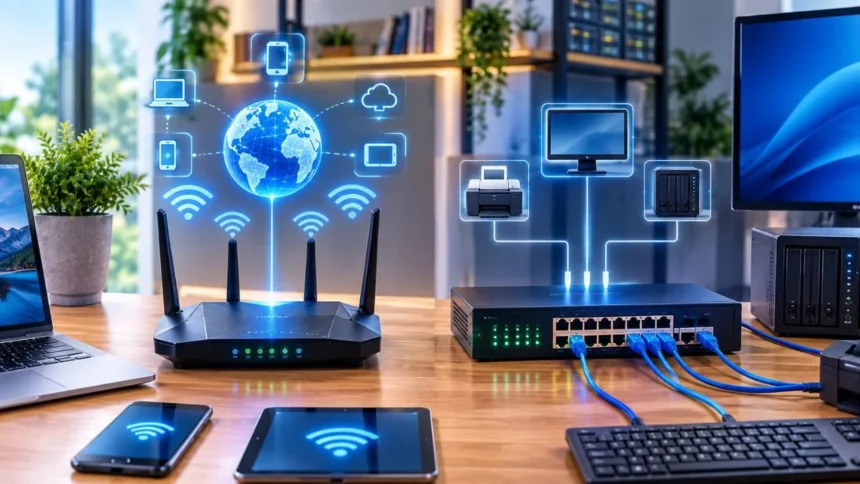
Router vs Switch: Choose the Right Device for Your Network
The router vs switch comparison can be confusing because both devices move data and often appear together in home and business networks. They may even look similar, with Ethernet ports, status lights and compact rectangular cases, but their primary responsibilities are different.
A switch connects devices within the same local network. It allows computers, printers, servers, cameras and wireless access points to exchange data efficiently. A router connects separate networks and usually provides the path between a local network and the internet.
In a typical small network, devices connect to a switch, and the switch connects to a router. The router then forwards internet-bound traffic toward the service provider while directing incoming responses back toward the correct local network.
Modern hardware can combine these roles. Many Wi-Fi routers contain a small Ethernet switch and wireless access point, while advanced Layer 3 switches can route traffic between network segments. The most useful distinction is therefore the device’s primary purpose rather than its appearance alone.
The Simple Difference
A network switch creates or expands a local area network, commonly called a LAN. It connects nearby wired devices and forwards information to the correct switch port, allowing those devices to communicate and share resources such as printers, storage and servers.
A router connects different IP networks. In a home, it commonly connects the private local network with the internet. In a larger organisation, routers may connect offices, data centres, service-provider links and multiple internal networks.
Traditional Layer 2 switches forward Ethernet frames using media access control addresses, usually called MAC addresses. Routers examine destination IP addresses and use routing information to decide where packets should travel next.
The simple router vs switch rule is this: use a switch to connect devices within a network and a router to connect one network with another. Advanced products may perform both functions, but this distinction remains useful when planning a home or business setup.
What Is a Router?
A router is a networking device that receives packets and forwards them between networks. It reads destination IP information and uses a routing table or related forwarding data to select an appropriate next path for each packet.
The router often sits at the boundary between the local network and an external network. A home or small-business router commonly acts as the gateway through which connected devices reach websites, cloud platforms, email services and other internet resources.
Business routers may connect several offices, internet services or wide area network links. They can also support traffic prioritisation, virtual private networks, security policies, backup connections and more advanced routing protocols.
The Internet Engineering Task Force historically defines a router as a system responsible for deciding which path network traffic should follow. Cisco similarly describes routers as devices that direct network data and choose routes according to packet destination information.
What Is a Network Switch?
A network switch connects devices so they can communicate within a local network. Desktop computers, printers, servers, security cameras, phones and wireless access points may all connect to ports on the same switch.
A basic switch learns which device is connected to each port by observing source MAC addresses. It stores this information in a MAC-address table and uses the table to forward traffic toward the intended destination rather than sending every frame through every port.
This targeted forwarding is one reason switches replaced older Ethernet hubs in most modern networks. A hub generally repeats received traffic to every connected device, while a switch sends ordinary unicast traffic through the port associated with the destination.
Switches are central components in home offices, business campuses and data centres. Models range from small unmanaged desktop units with a few ports to large managed platforms capable of supporting thousands of devices and multiple virtual networks.
How Routers and Switches Work Together
In a basic network, computers and other wired devices connect to the switch. One switch port then connects to the router, giving all appropriate devices on the switch a path toward other networks and the internet.
When two devices belong to the same local network or VLAN, the switch can normally forward their traffic directly. The router does not need to process every local file transfer, print job or communication between devices on the same network segment.
When a packet must leave the local network, the sending device forwards it toward its default gateway. The switch carries the frame to the router, and the router determines where the IP packet should go next.
Cisco describes a switch as the device that connects local devices and a router as the device that connects switches and their respective networks. This arrangement allows the switch to expand local connectivity while the router handles communication beyond that local segment.
MAC Addresses vs IP Addresses
A MAC address identifies a network interface at the Ethernet data-link level. A traditional Layer 2 switch learns MAC addresses and associates them with physical ports, allowing it to forward local Ethernet frames efficiently.
An IP address identifies a device or interface within an IP network. Routers read the destination IP address and compare it with their routing information to determine the next network or device toward which the packet should be forwarded.
MAC addresses are particularly important for communication within the local Ethernet segment. IP addresses make communication possible across multiple interconnected networks, including networks located in different buildings, cities or countries.
The difference is not absolute in modern hardware. Advanced switches may route using IP addresses, while routers also have MAC addresses on Ethernet interfaces. The router vs switch distinction is based mainly on whether the device primarily provides local switching or inter-network routing.
Layer 2 vs Layer 3
Network switches are traditionally associated with Layer 2 of the Open Systems Interconnection model. At this layer, the switch forwards Ethernet frames according to MAC addresses and keeps connected devices within the same local switching environment.
Routers are associated with Layer 3, also known as the network layer. They forward IP packets between different subnets or networks and can select routes that carry traffic beyond the local Ethernet segment.
A Layer 3 switch combines high-speed switching with IP routing capabilities. It may route traffic between VLANs inside a campus, office or data centre while continuing to provide ordinary Layer 2 connections for user devices.
Modern switches and routers therefore have overlapping features. Juniper explains that the practical difference increasingly depends on primary purpose: switches are generally purchased to connect many local devices, while routers are designed to route traffic between sites, networks and internet connections.
How a Switch Moves Local Traffic
Suppose one office computer sends a document to a network printer. The switch receives the Ethernet frame, checks its destination MAC address and looks for that address in its MAC table.
When the switch knows the correct destination port, it forwards the frame only through that port. Other connected computers do not need to receive and process a copy of the ordinary unicast frame.
When the destination is unknown, the switch may initially flood the frame through relevant ports within the same broadcast domain. Once the destination responds, the switch learns its location and can handle later traffic more directly.
This learning and forwarding process allows many devices to share the same network infrastructure efficiently. Cisco describes a switch as a traffic controller that learns connected devices and directs packets toward the correct destination port.
How a Router Moves Packets
A router receives a packet on one interface and examines its destination IP address. It then compares the address with entries in its routing table to determine the most appropriate outgoing interface or next-hop device.
The routing table may contain directly connected networks, manually configured static routes or routes learned through routing protocols. Large enterprise and internet routers use these routes to select paths across complex networks containing many possible destinations.
When several routes match a destination, the router uses defined criteria to choose between them. The exact selection process depends on route specificity, metrics, administrative policy and the protocols used in the network.
Routers act like network dispatchers rather than simple port expanders. Their purpose is to move traffic between separate IP networks and send packets toward the path that can reach the requested destination.
Internet Access
A router is normally required when a local network needs to communicate with the internet. It creates the boundary between the private network and the external service provided by an internet service provider.
The router receives outbound packets from local devices and forwards them toward the provider. Responses return through the router, which sends them into the appropriate internal network according to connection and addressing information.
A switch alone does not normally replace this gateway function. Adding a switch creates more local Ethernet connections, but those devices still require a router or another Layer 3 gateway to reach external networks.
For this reason, connecting a computer only to an ordinary standalone switch does not automatically create internet access. The switch must have an uplink toward a router, firewall or gateway that already has a functioning internet connection.
Network Address Translation
Home and small-business routers frequently provide Network Address Translation, commonly called NAT. NAT translates private internal IP addresses into a public address or addresses before traffic enters the internet.
Port Address Translation allows multiple devices to share one public IP address by distinguishing their connections through port information. This is why phones, televisions, computers and other devices can often access the internet through one household connection.
NAT is not the basic definition of routing, and not every router must use it. It is an additional function commonly placed on an internet-edge router where private networks connect with public networks.
A basic Layer 2 switch does not normally perform this translation. Its main job is to forward local Ethernet traffic, while the edge router or security gateway handles the relationship between private and public IP addressing.
DHCP and IP Assignment
Devices need suitable IP settings before they can communicate through an IP network. Dynamic Host Configuration Protocol, or DHCP, can assign addresses, network masks, gateway information and DNS settings automatically.
Many home and small-business routers contain a DHCP server. When a phone or computer joins the network, the router can provide the configuration needed for that device to communicate locally and reach external destinations.
A basic unmanaged switch does not normally assign IP addresses to connected devices. It forwards their Ethernet traffic but relies on a router, server or another DHCP service to provide their IP configuration.
Advanced Layer 3 switches can also provide or relay DHCP services, so this is another area where modern device features overlap. The normal home-network arrangement still places DHCP on the router supplied by the user or internet provider.
Router Ports vs Switch Ports
A typical home router may contain one internet or WAN port and several LAN ports. The WAN port connects toward the modem or provider equipment, while the LAN ports connect local wired devices or an additional switch.
A standalone switch normally provides a larger collection of similar Ethernet ports. Depending on the model, it may include 5, 8, 16, 24, 48 or more access ports, along with faster uplinks for connecting routers, servers or other switches.
Switch ports are often selected according to speed, media type and Power over Ethernet capability. Business models may include copper Ethernet, fibre-optic uplinks, modular interfaces and ports designed for different performance requirements.
The number of ports is not the only consideration. Backplane capacity, forwarding rate, uplink speed, PoE budget, management functions and redundancy can all determine whether a switch is appropriate for the intended network.
Speed and Performance
Switches are designed to forward large amounts of local traffic among connected devices. A suitable Gigabit or multigigabit switch can allow servers, workstations and storage devices to exchange data without forcing that traffic through the internet router.
The router’s performance becomes especially important for traffic moving between networks. Its WAN throughput, routing capacity, firewall inspection, VPN encryption and enabled security services may affect the internet speed users experience.
Buying a faster switch will not increase the speed of an internet plan when the router, modem or provider connection is the bottleneck. It may, however, improve local transfers when existing switch ports are slower than the connected devices.
Network performance should therefore be evaluated from end to end. Cable quality, port speeds, Wi-Fi conditions, internet service, router capacity and destination-server performance can all influence the final result.
Router Security Functions
A router positioned at the network edge often performs security-related functions in addition to routing. Depending on the model, these may include firewall inspection, virtual private networking, content filtering and intrusion-prevention capabilities.
The router can enforce rules controlling traffic between internal and external networks. Business models may also separate guest, employee, server and management networks while limiting which services can communicate across those boundaries.
A router should not be considered secure merely because it performs NAT. Strong protection also requires current firmware, restricted administration, appropriate firewall rules, secure passwords and properly configured wireless security.
More complex organisations may use a dedicated firewall behind or alongside the router. The appropriate design depends on the business’s risk, applications, users, internet links and regulatory requirements.
Switch Security Functions
Managed switches can apply controls inside the local network. They may support VLANs, port authentication, access-control rules, traffic monitoring and protections against certain Layer 2 attacks or configuration problems.
A switch can separate groups of devices without requiring a completely independent physical network for each group. For example, employee computers, guest devices, IP phones and security cameras may be placed in different VLANs.
Segmentation limits unnecessary communication and can reduce the impact of a compromised or misconfigured device. A router, firewall or Layer 3 switch can then control which types of traffic are permitted between those VLANs.
Unmanaged switches provide fewer security and visibility options. They may be suitable for a simple home extension, but managed switches are generally more appropriate when the network supports sensitive information, multiple user groups or critical business operations.
Managed vs Unmanaged Switches
An unmanaged switch is designed for plug-and-play operation. Connect the power, attach Ethernet devices and the switch begins forwarding traffic without requiring the user to create a configuration.
This simplicity makes unmanaged switches suitable for homes, small offices, desks and laboratories that need a few additional wired ports. They are usually less expensive and easier to install than managed models.
A managed switch allows administrators to configure and monitor its behaviour. Features may include VLANs, traffic prioritisation, port security, link aggregation, monitoring, loop protection and detailed performance information.
Cisco identifies control, security and cost as major differences between managed and unmanaged switches. Choose a managed model when the business needs segmentation, troubleshooting visibility or dependable control over how connected devices use the network.
VLANs and Network Segmentation
A VLAN, or virtual local area network, allows a managed switch to divide one physical switching system into separate logical broadcast domains. Devices can remain connected to the same switch while belonging to different virtual networks.
A small business might create separate VLANs for employees, guests, voice systems, servers and security cameras. This improves organisation and can support security policies appropriate to each type of device.
Devices in different VLANs normally need a router or Layer 3 switch to communicate. Inter-VLAN routing allows authorised traffic to cross between the segments while access rules can block unnecessary connections.
Cisco documentation identifies separate voice and data networks as a common VLAN use. VLANs can strengthen a network design, but they require accurate switch, router, firewall and wireless-access-point configuration to work safely.
Layer 3 Switches
A Layer 3 switch can forward ordinary Layer 2 traffic and route packets between IP networks. It is frequently used inside business campuses and data centres where several VLANs require high-speed communication.
The device may maintain routing tables, support static routes and run dynamic routing protocols. Its hardware is designed to route large amounts of internal traffic while continuing to provide the port density expected from a network switch.
A Layer 3 switch does not always replace an internet-edge router. The edge device may still be required for WAN links, NAT, advanced VPN functions, service-provider connections and comprehensive security services.
Juniper notes that modern switches can route using both Layer 2 and Layer 3 information. The difference between an advanced switch and router increasingly depends on whether the platform is primarily designed for connecting many local devices or for routing between locations and external networks.
Wireless Router vs Network Switch
A wireless router combines routing with the functions of a Wi-Fi access point. It allows wireless devices to join the local network while also providing a gateway toward the internet or another external connection.
Many wireless routers include a built-in Ethernet switch with several LAN ports. This is why a single home device can route internet traffic, provide Wi-Fi and connect a few computers through network cables.
The built-in switch usually has limited port capacity. When a home office needs additional wired devices, an external Ethernet switch can connect to one LAN port and expand the number of available connections.
A standalone switch does not normally provide Wi-Fi unless the model contains wireless-controller or access-point features. Wireless coverage is usually created through a Wi-Fi router or separate access points connected to the switch.
Modem vs Router vs Switch
A modem or optical network terminal connects the customer’s premises with the internet service provider’s access network. Its exact technology may use cable, fibre, digital subscriber line, cellular service or another transmission method.
The router takes that provider connection and creates a path between it and the customer’s private network. It commonly handles routing, NAT, DHCP and basic firewall functions in a home or small office.
The switch expands the wired local network and moves traffic among connected Ethernet devices. It does not normally establish the service-provider connection or perform the same external gateway role as the router.
Some providers supply one combined gateway containing a modem, router, switch and Wi-Fi access point. Understanding the separate functions remains useful when troubleshooting, upgrading Wi-Fi or adding more Ethernet connections.
Power over Ethernet Switches
Power over Ethernet, commonly called PoE, sends electrical power and network data through compatible copper Ethernet cabling. It can reduce the need for separate electrical outlets beside certain network devices.
PoE switches are frequently used for wireless access points, IP phones, cameras, sensors and other supported equipment. The device receives both its network connection and operating power through the same Ethernet cable.
Different PoE standards and devices have different power requirements. The switch must provide the correct standard and enough total power budget for every connected powered device.
A router may include one or more PoE-capable switch ports, but this is not guaranteed. Businesses connecting several access points, phones or cameras often use a dedicated PoE switch with suitable port capacity and power availability.
Home Network Setup
A simple home network may need only the provider’s combined Wi-Fi router. Its built-in LAN ports can connect a desktop computer, television, game console or other nearby wired device.
Add an unmanaged Gigabit Ethernet switch when the router does not have enough LAN ports. Connect one switch port to a LAN port on the router, then connect the additional wired devices to the remaining switch ports.
Place the switch where several Ethernet cables meet, such as near a television cabinet or home-office desk. Confirm that the cable connecting it to the router supports the required speed and is not damaged.
Most homes do not need a managed enterprise switch. A managed or PoE model becomes useful when the household uses multiple access points, security cameras, VLANs, advanced monitoring or other features beyond basic port expansion.
Small-Business Network Setup
A small-business network commonly uses a secure router or firewall at the internet edge. One or more managed switches then connect employee computers, servers, phones, printers, access points and other wired equipment.
Managed switches allow the business to separate employee, guest, voice, server and security-device traffic. The router, firewall or Layer 3 switch can apply policies controlling communication between these network segments.
PoE switches simplify the installation of access points, cameras and IP phones. Suitable uplinks and link aggregation may also prevent one connection between switches from becoming an avoidable bottleneck.
The business should plan for additional users, ports and bandwidth rather than buying only enough capacity for the first day. Central management, monitoring, redundancy and vendor support become increasingly valuable as the network grows.
Enterprise and Data-Centre Networks
Large networks use many switches arranged in structured topologies. Access switches connect end devices, while distribution, aggregation, core, leaf or spine switches carry traffic between major sections of the environment.
Routers connect campuses, branches, data centres, service providers and internet networks. High-end platforms support large routing tables, multiple high-speed links, redundancy and routing policies that control how traffic moves across the organisation.
The traditional boundaries between switching and routing are less visible at this scale. Data-centre switches may provide substantial Layer 3 routing, while routers may contain many high-density Ethernet interfaces.
Primary purpose remains the clearest distinction. Switches concentrate on connecting large numbers of devices and network segments inside an environment, while routers concentrate on moving traffic among broader networks, sites and providers.
Do You Need a Router or Switch?
Choose a router when you need to connect different networks, share an internet connection or create a gateway between a local network and an external service. A router is normally essential for a new home or office internet setup.
Choose a switch when the local network already works but does not provide enough wired Ethernet ports. The switch can connect additional computers, printers, access points, phones and cameras without replacing the router.
Choose both when several wired devices need to share one internet connection. This is the standard arrangement in many offices: the router provides external connectivity, and the switch supplies the local ports.
An advanced Layer 3 switch may handle internal routing, but an edge router or firewall can still be necessary for internet, WAN, VPN and security requirements. Select devices by required functions rather than trying to make one category replace the other unnecessarily.
How to Choose a Router
Start with the speed and type of internet or WAN connections the router must support. Its real firewall, VPN and routing throughput should be capable of handling expected traffic with the required security features enabled.
Consider the number of users, locations and network segments. A basic home router may suit a small household, while a growing company may need dual-WAN support, business VPNs, advanced policies and central monitoring.
For wireless routers, examine Wi-Fi generation, coverage, device capacity, Ethernet port speeds and mesh or access-point support. Large buildings often perform better with a wired router and several properly positioned access points rather than one powerful wireless router.
Security support is essential. Choose a current product with available firmware updates, strong administration controls and the firewall or VPN capabilities required by the network’s risk level.
How to Choose a Switch
Begin with the required port count and add capacity for future devices. An eight-port switch may be enough for a home office, while a business may need 24-port or 48-port models across several locations.
Match the port speed to connected equipment. Gigabit Ethernet is common for ordinary endpoints, while servers, storage systems, Wi-Fi access points and switch uplinks may benefit from multigigabit or faster connections.
Decide whether management is needed. Choose an unmanaged switch for simple port expansion and a managed switch when the network requires VLANs, monitoring, traffic prioritisation, access controls or redundancy.
Calculate the PoE requirement when powering cameras, phones or access points. Check both the power available on each port and the switch’s complete power budget, because sufficient port count does not guarantee enough electrical capacity.
Common Setup Mistakes
One mistake is connecting the internet modem directly to a basic switch and expecting every device to receive safe, private internet access. Most setups require a router or security gateway between the provider connection and the internal switch.
Another mistake is connecting multiple cables between unmanaged switches without understanding loops. A Layer 2 loop can produce duplicated frames and broadcast storms that disrupt communication across the local network.
Businesses also create problems by placing every device on one unrestricted network. Separating guests, employees, cameras, phones and servers through properly configured VLANs can improve organisation and reduce unnecessary access.
The final mistake is ignoring device capacity. A switch with enough ports may still have insufficient uplink speed or PoE power, while a router may fail to deliver the internet speed printed on the service plan when advanced security inspection exceeds its performance.
Conclusion: Use Each Device for Its Strength
The router vs switch difference begins with purpose. A switch connects devices within a local network, while a router connects separate networks and directs IP packets toward other subnets, sites or the internet.
Traditional switches operate mainly with MAC addresses at Layer 2, while routers make forwarding decisions using IP addresses at Layer 3. Modern Layer 3 switches and integrated routers create some overlap, but their primary design goals remain different.
Most home and business networks benefit from using both. The router provides internet and inter-network connectivity, while the switch supplies enough wired ports for local computers, printers, access points, cameras and servers.
Choose the router according to WAN performance, security and connectivity needs. Choose the switch according to port count, speed, management and PoE requirements. A correctly matched pair creates a network that is easier to expand, secure and troubleshoot.
Frequently Asked Questions
What is the main difference between a router and a switch?
A switch connects devices within the same local network, while a router connects different IP networks. The router commonly provides the path between a private network and the internet.
Can a switch replace a router?
A basic switch cannot replace a router when devices need internet access or communication between separate IP networks. A Layer 3 switch can route internally but may still lack required WAN, NAT, VPN or security features.
Do I need a switch if I have a router?
You need an additional switch only when the router lacks enough Ethernet ports or the network requires managed switching features. Many home routers already contain a small built-in switch.
Does a switch make the internet faster?
A switch does not increase the internet service speed. It may improve local connections or remove a slow-port bottleneck when its ports and uplinks are faster than the equipment being replaced.
Should a switch connect before or after the router?
In a typical network, the router connects to the modem or provider service first. The switch then connects to a LAN port on the router and expands wired connectivity for local devices.